Showing posts with label google. Show all posts

Huawei launches Honor & Ideos X5 smartphones in India

NEW DELHI: Huawei has announced the launch of Honor and the improved version of Ideos X5 smartphones in the Indian market. 

Running on Google Android Gingerbread,Huawei Honor features a 1,900 mAh battery, promising upto 9 hours of talk time, 6 hours of gaming and 10 hours of video. 

Featuring a 4-inch scratch resistant Gorilla glass and FWVGA display with 245 pixels per inch (PPI), Huawei Honor has a textured scratch-proof back. 

With a 1.4 GHz processor and a gyroscope, Huawei Honor packs an 8 megapixel AF rear camera with HDR, allowing users to capture pictures in ultra-bright and low lights. There's also a front camera for video chatting and 720P video recording and playback features. 

The phone is also DLNA-certified, which means it can play content wirelessly on other DLNA-certified devices such as digital cameras, game consoles and TVs. 

The phone will also let users blacklist and whitelist calls or protect their SMS from unauthorized use. Honor comes with a lock screen that has a built-in quick launch to the camera, SMS and phone apps. 

The phone also bundles an app called 'Data Traffic Manager' which lets users to set their monthly data package budget and offers an overview of data consumption over 2G/3G, WiFi networks and the apps consuming traffic. The phone is priced at Rs 19,990 (approximately). 

The Chinese phone maker has also launched an upgraded and improved version of Ideos X5 with Cloud features, a 1Ghz faster processor, FM Radio and 14.4 Mpbs faster download speeds. 

Priced at Rs 13,800, the new Ideos X5 offers 16GB Cloud space to store images, music and books. With Phone Finder, users can remotely locate phone or lock, backup or delete data to prevent phone from unauthorized use. Huawei Ideos X5 comes with a 5 megapixel camera with LED flash and ability to capture 720P high definition HD videos

Featuring a 3.8-inch WVGA capacitive touch display with multi touch support, Huawei Ideos X5 comes with 1500mAh battery which according to company promises a good standby and talk time.


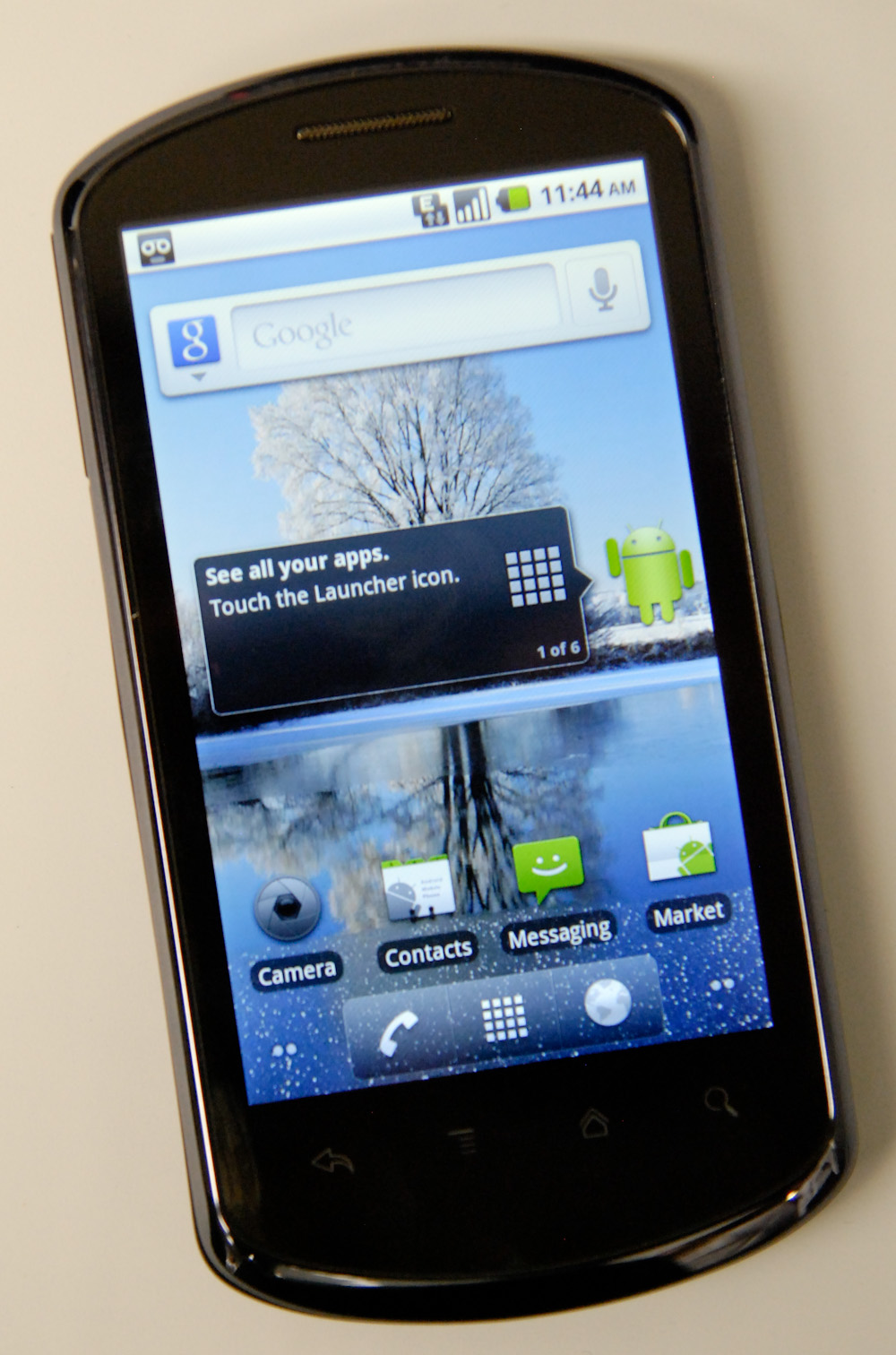
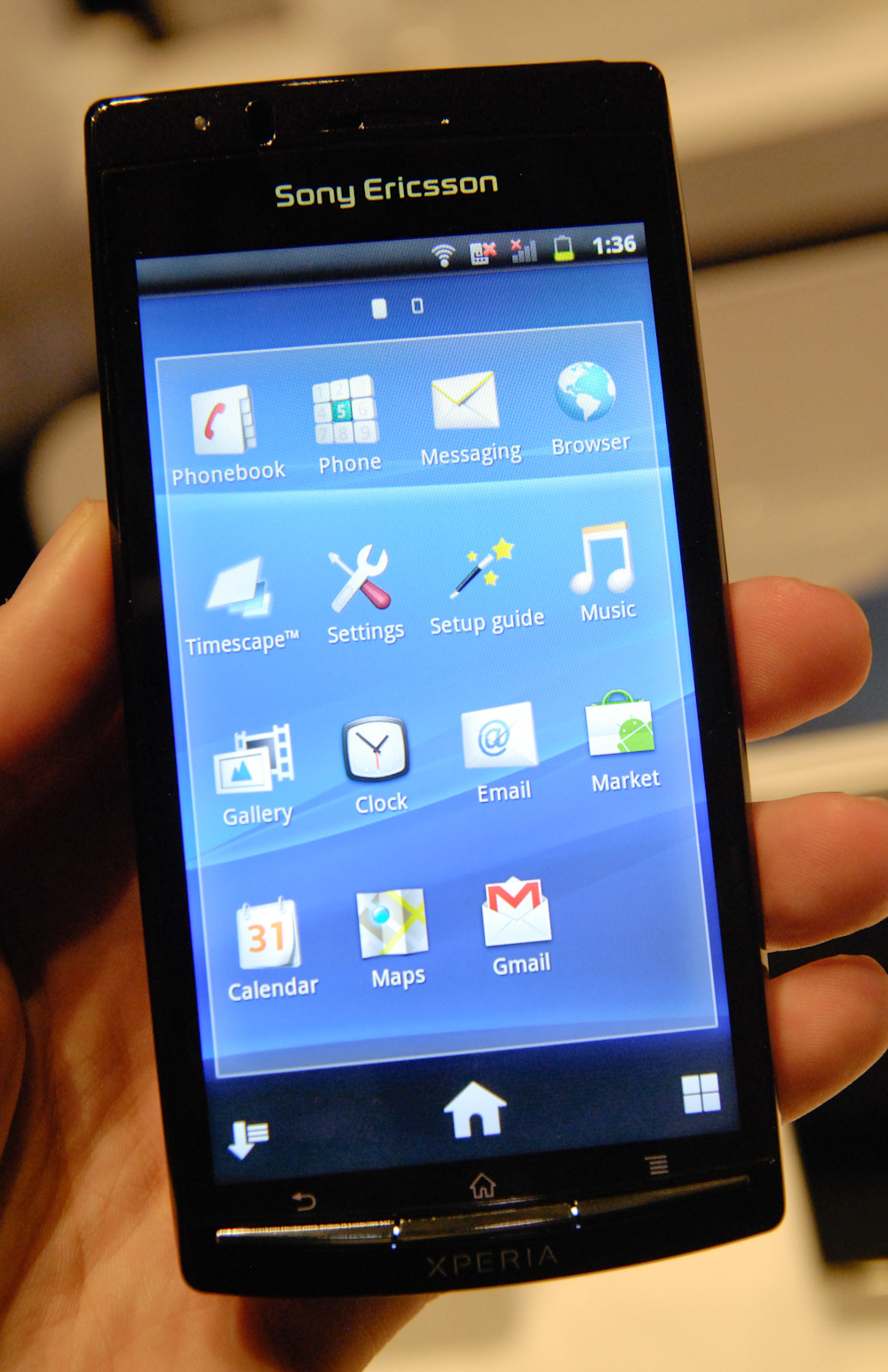
There have been an almost overwhelming number of smartphone launches during this CES - which is definitely a good thing. The whole team has been running around getting hands on time whenever possible in between meetings, and I've been doing the same all day both days. Two phones that I've been meaning to write about are the Huawei IDEOS X5 and Sony Xperia Arc. 
 
Huawei IDEOS X5 (left), Xperia Arc (right)
Huawei IDEOS X5
On Thursday morning, Huawei introduced its latest handset, the IDEOS X5, which runs stock Android 2.2.1 and packs the same 800 MHz MSM7230 we've seen in the T-Mobile G2. Huawei's spec list is rather impressive actually: 

Huawei Ideos X5
SoC800 MHz MSM7230 (45 nm Snapdragon)
GPUAdreno 205
RAM512 MB
NAND4 GB internal microSD, 512 MB ROM Storage
Camera5 MP, LED Flash, 720P Video Recording
Screen3.8" 800x480 LCD-TFT, Capacitive Touch
Bands (UMTS)HSPA+ 14.4, HSUPA 5.76Mbps: 900, 2100, AWS
Bands (GSM/EDGE)GSM/EDGE: 800, 900, 1800, 1900
Weight117 grams (4.12 oz)
I/OmicroUSB, BT 2.1, 802.11a/b/g/n WiFi (2.4 and 5 GHz), 3.5 mm audio

The industrial design of the IDEOS X5 is surprisingly tasteful, and reminds me a lot of a somewhat wider, simpler Nexus One. The back is a grey soft touch material, there's a Nexus One-ish camera ring, and overall the X5 just has a pleasant feeling in the hands.

It's also relatively thin at 8.7 mm, but not quite as thin as the other two "world's thinnest" devices that have debuted at CES (which seems to be a recurring theme lately). In all honesty, I was decently impressed with the X5's feel and build. 
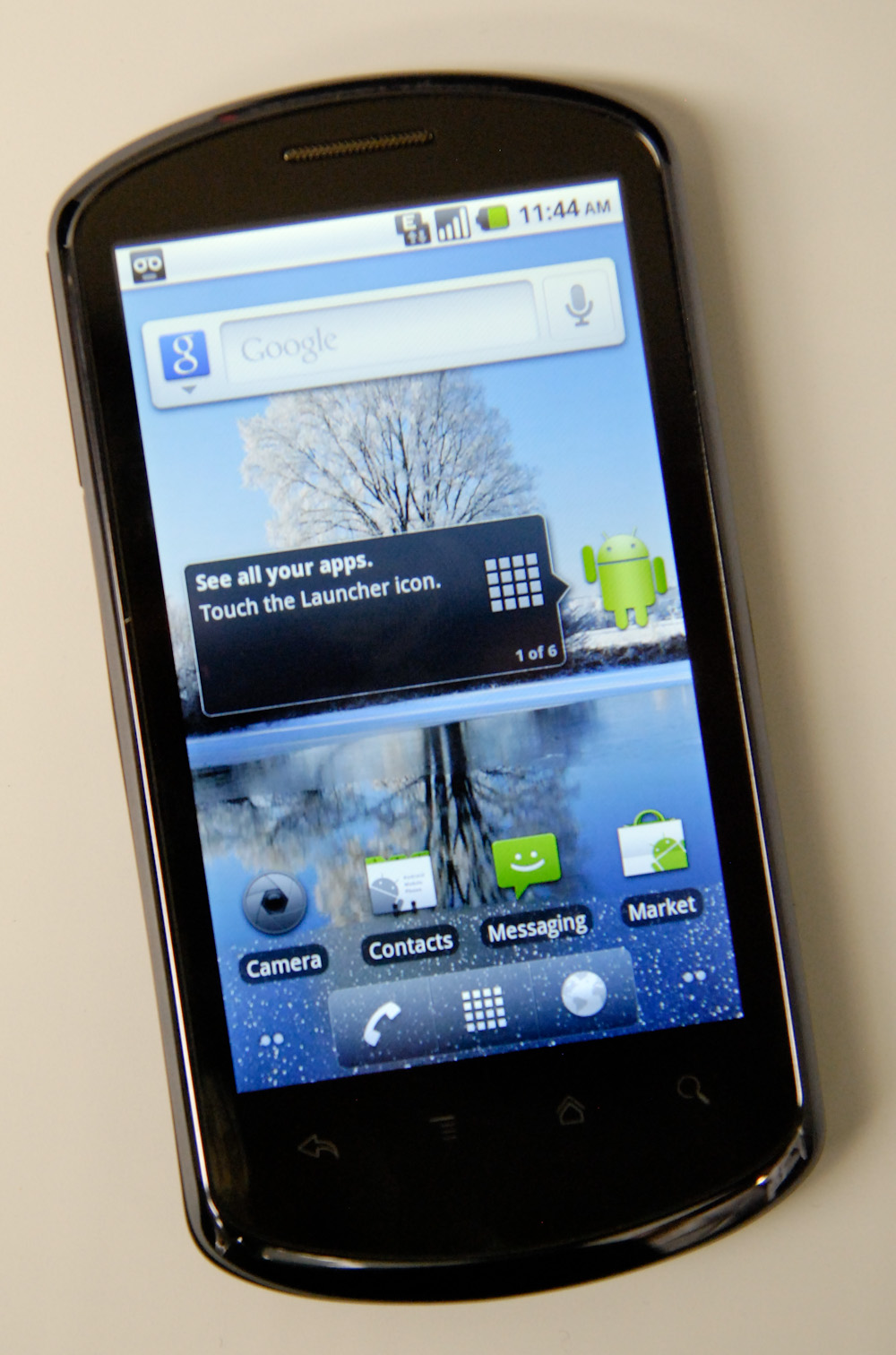
Front is all one unbroken piece of glass with capacitive Android buttons at the bottom. There's a chrome lip which runs around the edge of the phone.
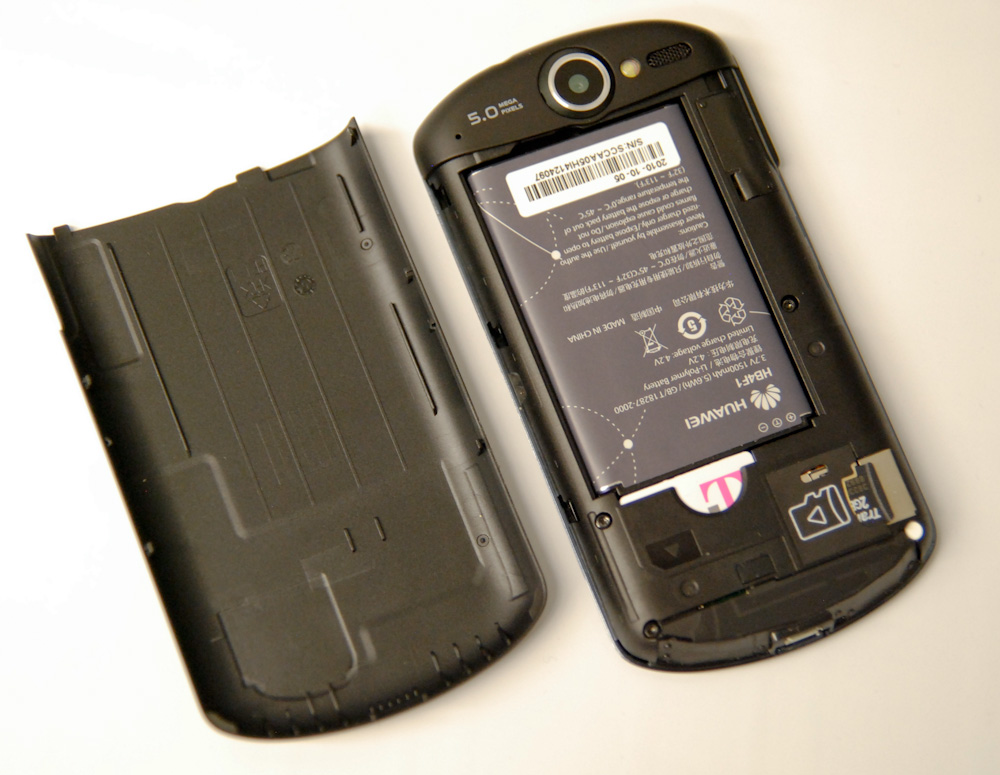
The back of the X5 slides off revealing (unsurprisingly) a T-Mobile SIM and the microSD card slot. It looks like there are antenna traces down on the bottom, like we're used to seeing for so many smartphones. The battery is 1500 mAh/5.6 Whr. There's also a noise cancellation microphone for voice calls just to the left of the 5.0 megapixel silk screening.
Huawei has demonstrated its ability to craft a quality, well put together handset with the X5, a huge improvement from previous devices which were criticized for feeling cheaper and flimsier than competing phones. They also pointed out that the X5 is just one of a number of IDEOS line devices coming in the future. I was decently impressed with everything I saw with the X5, including the fact that it packs a fast, modern SoC with HSPA+ support and has nearly everything else we'd expect from the likes of, say, HTC. It's clear we're going to see a lot more of Huawei in 2011, and we were told that there would be a later version sporting the 1 GHz MSM8255. Whether the X5 gets an update to gingerbread was a bit vague, however the 1 GHz version sporting the faster MSM8255 seems like a likely bet. If the X5 launches at a competitive enough price mid 2011, we could definitely see Huawei become as big of a player in the handset business as it is in the network equipment business. 

Eadweard J Muybridge celebrated in Google doodle


Eadweard J Muybridge celebrated in Google doodle
NEW DELHI: Wondering what those galloping horses are doing above Google search box today? The horses in Google doodle -- that come to life the moment one clicks on the play button -- celebrate the 182nd birth anniversary of legendary photographer Eadweard James Muybridge.

Born in England, Muybridge, who was of Dutch ancestry, spent a large part of his life in theUnited States. He is revered for his pioneering work in animal locomotion which used multiple cameras to capture motion. He is also remembered for his Zoopraxiscope, a device for projecting motion pictures that pre-dated the flexible perforated film strip.

The galloping horse shown in today's doodle was part of an experiment called 'Sallie Gardner at a Gallop'. The purpose of the photograph was to put to rest the debate over whether a horse's all four hooves get off the ground at the same time while it trots. Muybridge proved this through his series of 24 photographs shown on his Zoopraxiscope.

Known by several names, Muybridge was born as "Edward James Muggerid". He changed his name several times, before finally settling for "Eadweard J Muybridge".

In 1874, he killed his wife's lover. He was put on trial for the murder, however, was later acquitted as jury ruled his behaviour as "Justifiable Homicide." The Opera 'The Photographer' is believed to be based on his murder trial and was made by Philip Glass in 1982.

Google doodles are the decorative changes that are made to the Google logo to celebrate holidays, anniversaries, and the lives of famous artists and scientists. The first doodle was created by Larry Page and Sergy Brin in the year 1998 to mark the celebrations of the Burning Man Festival.


Mark of a writer: Top 5 books of Mark Twain


Today is the 176th birth anniversary of Mark Twain, the man often referred to as ‘the father of American literature’. Many are familiar with his immortal creations—Tom Sawyer and Huckleberry Finn—those irreverent teenagers whose adventures tell the story of every adolescent, in any corner of the world. What is less familiar is that his real name was Samuel Langhorne Clemens, and that he adopted his pen name from a practice often deployed by boats men on the Missouri river, called ‘marking the twain’.


1.Twains most famous work is of course The Adventures of Tom Sawyer (1876). Sawyer’s experiences draws on Twain’s life, and his escapades with friend Huck Finn and his first taste of love are staple reading in high schools around the world. Incidentally, Google’s doodle commemorating Twain’s birth anniversary takes off from one of the episodes in the book, where Sawyer tricks a friend into painting the fence, a chore he was assigned by his aunt.


2.Adventures of Huckleberry Finn (1884) concentrate on Huck’s tramp-like life and his efforts to liberate Jim from slavery (remember those were pre-abolition days). Regarded as one of the most influential works that has influenced generations of American writers, it throws light on the abdominal practice of slavery, and a young boy’s lone effort to do right.


3.Much of Twain’s writings also concentrate on his wide travels. Innocents Abroad (1869) is the account of his journey aboard a vessel called Quaker City through Europe and the Holy Land.


4.Roughing It (1872) was a prequel to Innocents Abroad, and it narrates the story of Twain’s travels through the wild west American country during the years 1861-1867.


5.A very different kind of reading experience is A Connecticut Yankee in King Arthur’s Court, written in 1889, where Hank Morgan is transported back in time from the 19th century to King Arthur’s legendary court. The book is meant as a satire on contemporary society, but generates good laughs even if you are not reading between the lines.

Top 10 Obscure Google Search Tricks


Top 10 Obscure Google Search Tricks


When it comes to the Google search box, you already know the tricks: finding exact phrases matches using quotes like "so say we all" or searching a single site using gmail. But there are many more oblique, clever, and lesser-known search recipes and operators that work from that unassuming little input box. Dozens of Google search guides detail the tips you already know, but today we're skipping the obvious and highlighting our favorite obscure Google web search tricks.

10. Get the local time anywhere

What time is it in Bangkok right now? Ask Google. Enter simply what time is it to get the local time in big cities around the world, or add the locale at the end of your query, like what time is it hong kongto get the local time there.

9. Track flight status

Enter the airline and flight number into the Google search box and get back the arrival and departure times right inside Google's search results.

8. Convert currency, metrics, bytes, and more

Google's powerful built-in converter calculator can help you out whether you're cooking dinner, traveling abroad, or building a PC. Find out how many teaspoons are in a quarter cup (quarter cup in teaspoons) or how many seconds there are in a year (seconds in a year) or how many euros there are to five dollars (5 USD in Euro). For the geekier set, bits in kilobytes (155473 bytes in kilobytes) and numbers in hex or binary (19 in binary) are also pretty useful.

7. Compare items with "better than" and find similar items with "reminds me of"

Reader Adam taps the wisdom of the crowds by searching for like items using key phrases. He writes in:
Simply search for, in quotes: "better than _keyword_"
Some example results:


Results 1 - 100 of about 550 English pages for " better than WinAmp".


Results 1 - 57 of 57 English pages for " better than mIRC".
Results 1 - 100 of about 17,500 English pages for " better than Digg". (Wow. Poor Digg.)
The results will almost always lead you to discovering alternatives to whatever it is you're searching for. Using the same concept, you can use this trick to discover new music or movies. For example, " reminds me of _someband_" or "sounds like _someband_" will pull up artists people have thought sounded similar to the one you typed in. This is also a great way to find good, no-name musicians you'd probably never know of otherwise.
Examples:


Results 1 - 88 of 88 English pages for " reminds me of Metallica".


Results 1 - 36 of 36 English pages for " similar to Garden State".


Results 1 - 66 of 66 English pages for " sounds like The Shins".
Just get creative and you'll, without a doubt, find cool new stuff you probably never knew existed.

6. Use Google as a free proxy

What, your company blocks that hip new web site just because it drops the F bomb occasionally? Use Google's cache to take a peek even when the originating site's being blocked, with cache:example.com.

5. Remove affiliate links from product searches

When you're sick of seeing duplicate product search results from the likes of eBay, Bizrate, Pricerunner, and Shopping.com, clear 'em out by stacking up the -site:ebay.com -site:bizrate.com -site:shopping.com operator. Alternately, check out Give Me Back My Google (original post), a service that does all that known reseller cleaning up for you when you search for products. Compare this GMBMG search for a Cruzer 1GB flash drive to the regular Google results.

4. Find related terms and documents

Ok, this one's direct from any straight-up advanced search operator cheat sheet, but it's still one of the lesser-used tricks in the book. Adding a tilde (~) to a search term will return related terms. For example, Googling ~nutrition returns results with the words nutrition, food, and health in them.

3. Find music and comic books

Using a combination of advanced search operators that specify music files available in an Apache directory listing, you can turn Google into your personal Napster. Go ahead, try this search for Nirvana tracks: -inurl:(htm|html|php) intitle:"index of" +"last modified" +"parent directory" +description +size +(wma|mp3) "Nirvana". (Sub out Nirvana for the band you're interested in; use this one in conjunction with number 7 to find new music, too.) The same type of search recipe can find comic books as well.

2. ID people, objects, and foreign language words and phrases with Google Image Search

Google Image search results show you instead of tell you about a word. Don't know what jicama looks like? Not sure if the person named "Priti" who you're emailing with is a woman or a man? Spanish rusty and you forgot what "corazon" is? Pop your term into Google Image Search (or typeimage jicama into the regular search box) to see what your term's about.

1. Make Google recognize faces

If you're doing an image search for Paris Hilton and don't want any of the French city, a special URL parameter in Google's Image search will do the trick. Add&imgtype=face to the end of your image search to just get images of faces, without any inanimate objects. Try it out with a search for rose (which returns many photos of flowers) versus rose with the face parameter.
What's your favorite ninja Google search technique? Tell us about it in the comments.

10 Web Browsers You Probably Haven’t Heard Of


Firefox. Internet Explorer. Chrome. Safari. Opera. We’ve pretty much all heard of them by now. They’ve been fighting for market share for the past few years (Internet Explorer has been fighting for it for a lot longer than that), and it’s unlikely any of them will ever come out the absolute winner. They try to be all things to all people. And that’s great.
Except…
What if you’re looking for a browser that does just the things you want to do online? What if you’re sick of all the browser-war hubub and want something that’s truly unique and different (and, maybe, works better than the mainstream options)? What then?
10 Web Browsers You Probably Haven't Heard Of
Well, there’s good news. There are more than a dozen excellent alternative browsers out there if you’re looking for something distinctive. Below are ten such web browsers, along with why you might want to consider using them.

1. Stainless

Stainless
Stainless is a browser created in response to Google Chrome. It utilizes multi-processing architecture like Chrome (which, at the time of inception, wasn’t available for OS X), but also has some excellent features not found in other browsers. One of the most interesting features is the ability to log into one website using two different accounts in separate tabs.
Why you should consider it: The ability to log into a site with different credentials in different tabs makes this an excellent option for many. It’s especially useful if you have, say, work-related Gmail accounts and personal Gmail accounts.
Current release version: 0.7.5
Operating systems supported: OS X Leopard and Snow Leopard.

2. Maxthon

Maxthon
Maxthon is a highly configurable browser that places an emphasis on security. It has a built-in Ad Hunter that blocks most ads, as well as security features to prevent spyware, malware, and viruses. It lets you fully customize your browsing experience (you can choose between using menus, hot keys, word aliases, toolbars, or mouse gestures, plus there are more than 1,400 plug-ins to add functionality). It has filters available to block irritating or offensive content.
Other Maxthon features include a built-in screen capture tool, URL aliases for faster surfing, a built-in feed reader, an online favorites service, advanced proxy rules, and an anti-freeze feature.
Why you should consider it: If you want a customizable browser, Maxthon might be what you’re looking for; it’s built specifically for power users. Between plugins, skins, filter packs, and other customizable features, it truly lets you personalize your browsing experience. For parents concerned about their children’s’ activities online, the filters for blocking content can be reassuring.
Current release version: 2.5.11 (the Classic Version is also available: 1.6.5)
Operating systems supported: Windows

3. Sleipnir

Sleipnir
Sleipnir is very popular in Japan with a majority share in the country. It’s a profoundly customizable browser that maintains speed and performance despite customizations. There are skins and plugins available for it, letting you change the design and settings of the browser to suit your needs. And as all good browsers should, it stresses on security and usability, and allows for tabbed browsing.
Why you should consider it: Sleipnir is an option if you want a highly customizable browsing experience.
Current release version: 2.9.2
Operating systems supported: Windows 98 and newer

4. Swiftfox

Swiftfox
Swiftfox is an optimized build of Firefox that’s faster and more cutting edge than the regular Firefox distribution. It works with Firefox plugins, making it remarkably extensible. The overall user interface is similar to Firefox, but is a bit more minimalist and clutter-free. Most other features are in line with what Firefox has to offer.
Why you should consider it: If you love Firefox but want something faster and lighter, then Swiftfox is your best bet.
Current release version: 3.5.6
Operating systems supported: Linux

5. Lunascape

Lunascape
Lunascape is the world’s first and only triple engine browser. That’s right: it’s a hybrid browser that runs on Gecko, Trident, and WebKit. It supports plugins and add-ons from Firefox, Internet Explorer, as well as their own plugin platform. It’s touted to be faster and lighter than many other browser options.
Why you should consider it: If you find yourself constantly switching back and forth between browsers (either for cross-browser testing of web designs or because of add-ons available only to Firefox or Internet Explorer), Lunascape is a perfect fit for you.
Current release version: 6.0.1
Operating systems supported: Windows

6. Konqueror

Konqueror
Konqueror combines web browsing, local and remote file management, and a universal viewing app that lets you view documents without having to launch other programs. It’s open source and HTML 4.01 compliant. It embraces Netscape plugins (like those for Flash or RealVideo). Konqueror also has a built-in FTP and WebDAV support.
Why you should consider it: If you’re a Linux user who wants a browser that can multitask, then Konqueror is definitely something to look into. It’s especially useful for those who want to be able to manage files right from within their browser.
Operating systems supported: Linux

7. SeaMonkey

SeaMonkey
SeaMonkey is developed by Mozilla and is an "all-in-one" internet suite of apps. While the browser within SeaMonkey is pretty standard (and not unlike Firefox), what sets it apart is that it has integrated email, newsgroups, an HTML editor, IRC Chat, and web development tools. The mail feature offers tabbed reading and supports tagging and alternate views for better email finding and reading. The HTML editor renders CSS and gives you dynamic image and table resizing. For web developers, you can take advantage of the JavaScript debugger and a DOM inspector.
Why you should consider it: For developers and designers, SeaMonkey has a plethora of useful built-in features. It’s also a great option for people who like to run the bare minimum number of apps.
Current release version: 2.0.1
Operating systems supported: Windows 2000 and newer, Mac OS X 10.4 and newer, and Linux.

8. OmniWeb

OmniWeb
OmniWeb is a WebKit browser created by the same people who created OmniGraffle and OmniOutliner. It aims to be fun and easy to use (like other Omni products) and shares a similar user interface. It has all the standard browser features we’ve come to expect (including tabbed browsing, bookmarks, and ad blocking), but also includes Workspaces, which lets you save browsing sessions to open later and includes an auto-save option and a built-in RSS reader.
Why you should consider it: For Mac users who want a browser that’s efficient and easy to use, OmniWeb might be just what you’re looking for. It’s appropriate for power users too, and the Workspaces feature is especially handy.
Current release version: 5.0.1
Operating systems supported: Mac OS X 10.4.8 or newer

9. Camino

Camino
Think of Camino as a Firefox build specifically for Macs, built on the Gecko 1.9 rendering engine. It includes phishing and malware protection, tabs (including a tab overview function that lets you see all your open tabs at once), "annoyance blocking" (which blocks ads, pop-ups, and Flash animations), Keychain support (to save your browsing credentials), and download notifications. It also includes AppleScript support, feed detection, session saving, recently closed tabs, and full keyboard access.
Why you should consider it: Camino is a great browser for Mac users who like Firefox but want something built specifically for the Mac.
Current release version: 2.0
Operating systems supported: Mac OS X 10.4 or newer

10. Flock

Flock
Flock is probably better known than many of the other browsers above, especially if you’re a social media addict. Flock was created specifically to make managing your social media activities easier from within your browser.
Flock focuses on staying connected through social media by making sharing and publishing things easier. It integrates directly with Facebook, Gmail, Digg, YouTube, MySpace, Flickr, Twitter, WordPress, Blogger, Delicious, Bebo, TypePad, Picasa, and more. Special features include a People sidebar, a Media bar (to browse photos and videos from your favorite sites), a built-in feed reader, a photo uploader, a blog editor, and more. There are also extensions and custom themes available for download.
Why you should consider it: Flock is a great choice for social media power users who want to be able to connect with all their social media accounts from one place.
Current release version: 2.5
Operating systems supported: Windows, Linux, Mac OS X